AI Attendance System Explained: Key Factors to Consider

AI Attendance System used to be a simple administrative task: a register, a punch card, maybe a fingerprint scanner by the door. That was manageable when everyone worked from one office, on one shift, under one supervisor. It stops being manageable the moment a workforce spreads across multiple sites, mixes permanent staff with contractors, and operates in places where network connectivity is unreliable and the supervisor isn’t always around to vouch for who showed up.
This is the gap that AI attendance systems were built to close. But “AI attendance system” has become something of a catch-all term, applied to everything from a basic face-scanning app to a full platform that can flag fraud before it ever reaches payroll. If you’re evaluating options for your organization, understanding what actually separates these systems and which features matter for your specific situation will save you from buying a tool that looks impressive in a demo but falls apart in the field.
This guide breaks down what AI attendance systems are, how they work, and the concrete factors to weigh before you commit to one.
What Exactly Is an AI Attendance System?

At its core, an AI attendance system is software that uses artificial intelligence, typically facial recognition, GPS or geofencing, and machine learning-based pattern analysis to record and verify employee attendance automatically, without relying on manual entry or dedicated biometric hardware at every location.
The distinction between this and a basic digital attendance app comes down to one thing: understanding versus recording. A spreadsheet or a simple punch-in app captures a timestamp. It has no idea whether that timestamp is suspicious, whether the person clocking in is who they claim to be, or whether the pattern of clock-ins at a particular site looks normal compared to every other site. An AI-driven system is built to notice those things.
Most platforms in this space operate across a few layers of capability, even if they don’t market it that way:
- Identity verification confirming who is actually clocking in, usually through face recognition, a registered mobile device, or GPS-confirmed presence at a specific location.
- Pattern and anomaly detection using historical data to learn what “normal” attendance looks like for a given employee, shift, or site, and flagging deviations such as clock-ins from unexpected locations or a spike in manual corrections.
- Decision support surfacing only the records that actually need a human’s attention, rather than handing HR a pile of raw data to sift through manually.
A lot of products on the market only do the first of these. That’s still useful; it solves the “is this really the right person” problem, but it leaves the harder operational questions unanswered.
How These Systems Actually Work
It helps to walk through the lifecycle of a single attendance record, from the moment an employee joins the system to the moment that data lands in payroll.
Enrollment. Each worker is registered once, typically via a mobile phone or tablet rather than specialized hardware. For face-recognition systems, this means capturing a facial template. For location-based systems, it means defining the geographic boundary (a geofence) for each work site.
Verification at clock-in. When someone clocks in, the system checks identity and location at the same time. Face recognition confirms the person is who they say they are; GPS confirms they’re actually where they’re supposed to be. Done well, this combination is far harder to game than a shared PIN or a buddy punching in on someone else’s behalf.
Centralized data capture. Every verified clock-in flows into a single dashboard in something close to real time, rather than sitting in a site-level register that someone has to manually consolidate later.
Pattern analysis. This is where the “intelligence” part earns its name. The system compares incoming attendance data against historical patterns by employee, by site, by shift, and flags anything that looks off. A worker who normally clocks in from one location suddenly shows up from somewhere else. A site where manual time corrections happen far more often than at comparable sites. These are the kinds of signals that are nearly invisible in a manual system until payroll discrepancies force someone to investigate.
Review and resolution. Rather than asking a manager to comb through hundreds of records, the system narrows the list down to what actually warrants a second look, ideally with enough context to resolve it quickly.
Why Traditional Systems Struggle With This
Office teams in a single fixed location can get by on registers, basic apps, or a fingerprint scanner at the entrance. The same approaches break down quickly once you’re managing contract labor, multiple sites, or field-based teams:
- Buddy punching is nearly impossible to prevent with a register or a basic app, and surprisingly common in workforces with high turnover.
- Remote sites often need their own hardware if you’re relying on biometric scanners, which adds cost and maintenance overhead at every new location.
- Multi-site visibility disappears when every location keeps its own register or its own spreadsheet, with no shared view for HR or operations.
- Payroll accuracy suffers when records have to be manually collected and reconciled from a dozen different sources before a single pay run.
- Fraud and time theft typically stay invisible until someone notices a discrepancy during a payroll audit, well after the damage is done.
None of these problems is fatal for a 30-person office. They become a serious operational drag once you’re tracking attendance for hundreds of workers spread across many locations.
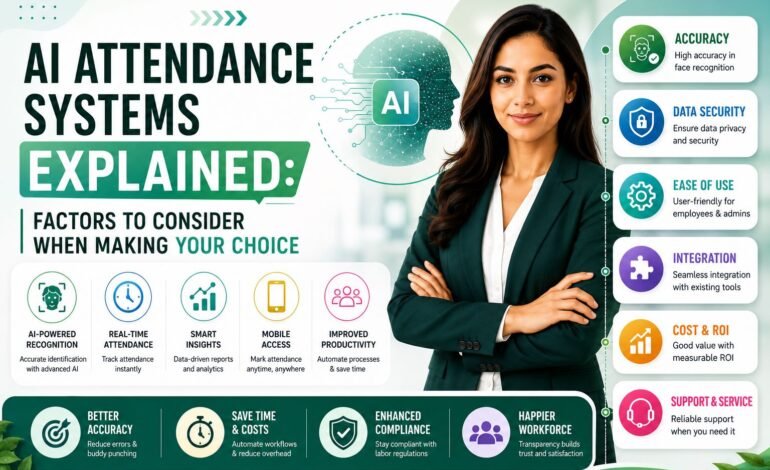
Factors Consider When Choosing an AI Attendance System

This is really the heart of the decision, and it’s where a lot of buyers focus on the wrong things usually the slickness of the interface rather than how the system behaves under real-world conditions. Here’s what actually matters.
1. Accuracy and liveness detection
Face recognition accuracy gets a lot of attention, but liveness detection is arguably more important. Liveness detection is what stops someone from holding up a photo or a video of a colleague to fake a clock-in. A system without it is not meaningfully more secure than a shared password. Ask vendors directly how they handle spoofing attempts, and ask for evidence rather than a general assurance.
2. Offline functionality
Construction sites, warehouses, and rural or remote locations frequently have patchy or nonexistent connectivity. A system that simply fails to record attendance when the network drops is a liability, not a convenience. Look for systems that can capture attendance locally on the device and sync once a connection is restored, and ask specifically how the system handles conflicts (for example, two records syncing out of order).
3. Hardware dependency
Hardware-dependent systems slow down deployment in a different way: each new site means buying, installing, and maintaining equipment rather than just adding a user. Mobile-first systems that work on existing smartphones or tablets are typically faster to roll out and cheaper to scale, especially for organizations adding or rotating sites frequently.
4. Integration with payroll and HR systems
Clean attendance data isn’t worth much if it has to be manually re-entered into your payroll or HRMS platform. Ask what integrations are supported out of the box, whether the exported data is structured in a way your finance team can actually use, and how manual corrections are tracked and logged for audit purposes.
5. Centralized, multi-site visibility
If you’re managing more than one location, you need a single dashboard view, not a separate report per site that someone has to stitch together manually. Confirm that supervisors, HR, and operations leadership can all see consistent, real-time data, and that access can be restricted appropriately by role and location.
6. Anomaly and fraud detection
This is the feature buyers most often forget to ask about, and it’s the one that separates a basic identity-verification tool from a genuinely useful attendance system. Is the platform just keeping a log of clock-ins, or is it actively watching for trouble, repeated manual corrections at one site, clock-ins from places they shouldn’t be, shifts that don’t follow the usual pattern, and surfacing those for review before payroll goes out? Ask for a concrete example of how the system handles a suspicious pattern, not just a feature list.
7. Data privacy and security
Biometric data carries higher regulatory and ethical stakes than a simple timestamp. Check whether raw facial data is retained after a template is created, how data is encrypted both in transit and at rest, and whether the vendor’s practices align with the privacy regulations applicable in your region. This is worth a direct conversation, not just a checkbox on a feature sheet.
8. Role-based access and audit trails
Not every user needs the same level of access. HR, site supervisors, and senior management typically need different views and different editing permissions. Make sure any correction, override, or manual edit to an attendance record is logged with a clear audit trail. This matters both for internal trust in the data and for any external compliance review.
9. Deployment speed and support
A system that takes months to roll out at each new site undermines the flexibility that made AI attendance attractive in the first place. Ask how long onboarding takes for a typical new location, what support looks like during rollout, and what happens when something breaks in the field, not in a controlled demo environment.
10. Cost relative to workforce complexity
Pricing models vary widely, and the cheapest option per seat isn’t always the cheapest in practice if it requires extra hardware, more IT support, or more manual reconciliation down the line. Weigh total cost of ownership against the complexity of your workforce. A stable office team has very different needs than a rotating pool of contract labor across a dozen sites.
Questions Worth Asking Before You Sign
A short, practical checklist to bring into any vendor conversation:
- How does the system behave when a site has no internet connection at clock-in time?
- What specifically triggers an anomaly flag, and who is notified when it happens?
- How long does onboarding take for a brand-new location?
- Can the platform handle a mixed workforce of permanent, contract, and temporary staff without separate setups?
- What happens to biometric data after enrollment, and how is it secured?
See how FRANS works. Book a demo.
Bringing It Together
An AI attendance system is most valuable when it does more than confirm that someone showed up. The systems worth paying for verify identity, understand location, work reliably even when connectivity doesn’t, and surface the handful of records that actually need a human decision instead of burying that decision in spreadsheets after the fact.
When you’re comparing options, resist the pull of a polished demo screen and focus instead on how each system performs under the conditions your workforce actually operates in: spotty networks, multiple sites, a mix of worker types, and the inevitable edge cases that only show up once a system is live. Get specific answers to specific questions, and you’ll end up with a system that earns its place in your operations rather than one that just looks good in a sales pitch.